
• About Us
  • Advertise With Us
  • Contact Us
Wednesday, February 18, 2026
Quick Read Magazine
  • Home
  • News
  • Business
  • Finance
  • Entertainment
  • Jobs
  • Technology
No Result
View All Result
  • Home
  • News
  • Business
  • Finance
  • Entertainment
  • Jobs
  • Technology
No Result
View All Result
QuickRead.Co.Za
No Result
View All Result
  • Home
  • News
  • Business
  • Finance
  • Entertainment
  • Jobs
  • Technology

Home » Education » TUT myTuTor: How to Access myTuTor TUT Online Portal

TUT myTuTor: How to Access myTuTor TUT Online Portal

Hlulani Baloyi by Hlulani Baloyi
6 February 2021
in Education, How To, Technology
Reading Time: 2 mins read
TUT myTUTor TUT
ADVERTISEMENT

TUT myTUTor is the official online eLearning portal for Tshwane University of Technology (TUT) students. In this article, you will learn how to access myTUTor TUT online portal. You will also learn how to reset TUT myTUTor Login password.

ALSO READ: How to Check TUT Application Status Online

What is TUT myTUTor?

TUT myTUTor is Tshwane University of Technology (TUT) online learning portal for students studying at TUT. Students can access the portal to study online.

How to Access TUT myTuTor

Always use Mozilla Firefox or Google Chrome as your browser to access myTUTor.

  • Step 1: Visit https://mytutor.tut.ac.za/
  • Step 2: Enter your username (Student Number) and Password (TUT4life email password)
  • Step 3: Click “Login”

Please note that your username is your TUT student number and your password is the same as your TUT4life email password.
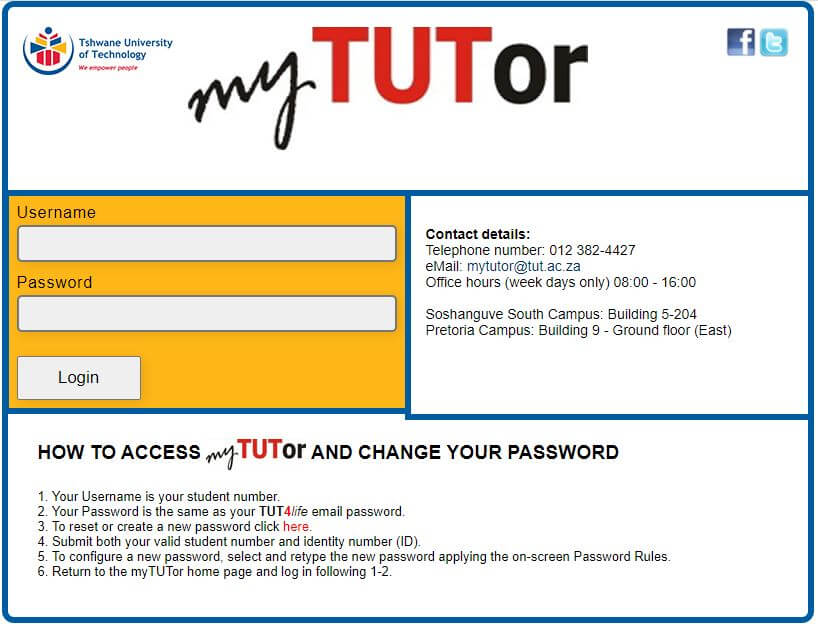
TUT myTUTor Login
TUT myTUTor Login Page

How to Reset or Change myTUTor TUT Password

To reset or create a new password for your myTUTor TUT, follow the below steps:

  • Step 1: Go to https://tut4life.tut.ac.za/password/
  • Step 2: Enter your Student Number and ID / Passport Number
  • Step 3: Then click “Submit“
  • Step 4: To configure a new password, select and retype the new password applying the on-screen Password Rules.
  • Step 5: Return to the myTUTor home page and log in

If after 48 hours you still cannot log in or see all your subjects, then contact the myTUTor service desk at 012 382 4427 or [email protected].

Image Courtesy: mytutor.tut.ac.za

Tags: myTuTor TUTTUTTUT myTuTorTUT myTutor Login
ShareTweetSend
Previous Post

How to Check TUT Application Status Online

Next Post

Namaste Wahala Launching this Valentine’s Day

Hlulani Baloyi

Hlulani Baloyi

Hlulani Baloyi is a contributing writer at Quick Read. Studied Journalism at Rosebank College. Loves reading books. Passionate in exploring and cooking local cuisines. Enthusiastic as an amateur cricket player.

Related Posts

TUT Late Application Link 2026

TUT Late Application Link 2026, Apply For TUT Late Applications

15 January 2026
TUT myTUTor Login

my TUTor Login, Learn How to Access myTUTor Login

27 August 2025
Tshwane University of Technology TUT Exam Results

How To Check Your Tshwane University of Technology TUT Exam Results

26 April 2025 - Updated on 27 August 2025
TUT Status Check

TUT Status Check Via ITS iEnabler

8 May 2024
TUT Login Guide

TUT Login – TUT Application And Login Process Online

24 April 2024
TUT Exam Results

How To Access Your TUT Exam Results

25 March 2024
Next Post
Namaste Wahala Netflix

Namaste Wahala Launching this Valentine's Day

Leave a Reply Cancel reply

Your email address will not be published. Required fields are marked *

Latest Posts

SA Daily Lotto Results

Daily Lotto Results for Today – Wednesday, 18 February 2026

18 February 2026
UK49s Teatime Results 2024

UK49s Teatime Results For Today – Wednesday, 18 February 2026

18 February 2026
UK49s Lunchtime Result For Today

UK49s Lunchtime Results for Today – Wednesday, 18 February 2026

18 February 2026
Ithuba Daily Lotto Predictions

Daily Lotto Predictions for Today, Wednesday, 18 February 2026

18 February 2026
UK49s Teatime Predictions for Today

UK49s Teatime Predictions For Today: Wednesday, 18 February 2026

18 February 2026
ADVERTISEMENT
  • About Us
  • Contact Us
  • Advertise With Us
  • Privacy
  • Terms and conditions
Follow Us

QuickRead.Co.Za | All Rights Reserved

No Result
View All Result
  • About Us
  • Advertise With Us
  • Contact Us

QuickRead.Co.Za | All Rights Reserved