UKZN Student Central, also known as the Student Enabler Portal, is a gateway enabling University of KwaZulu-Natal (UKZN) students to obtain necessary information and conduct academic activities.
Students can access UKZN Student Central through the university website or by downloading the Student Enabler mobile app. To log in, students will need to enter their student number and password. UKZN Student Central is a valuable resource for all UKZN students. It is a convenient and efficient way to access essential information and services.
How to log into UKZN student central
To access the student central of UKZN,
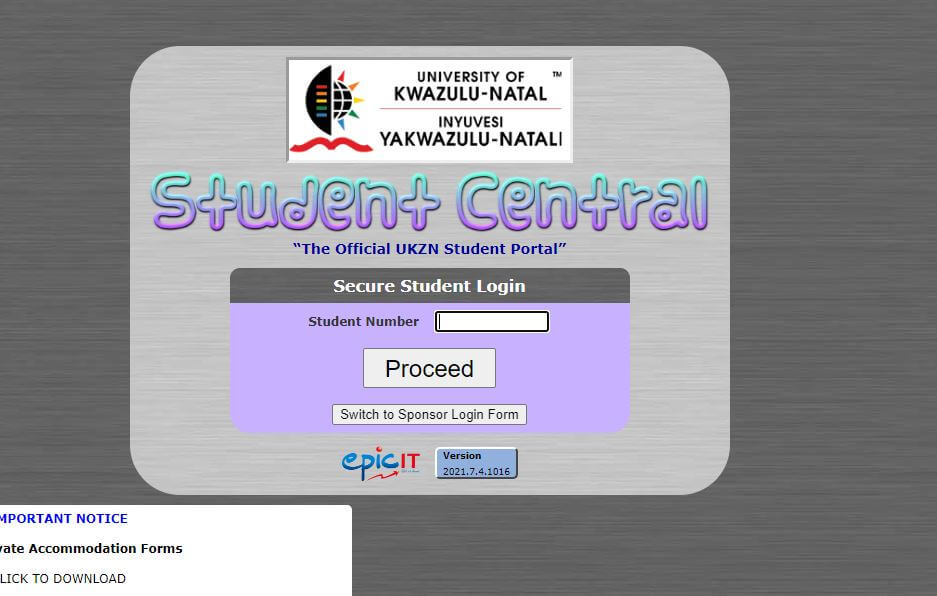
- Navigate to directly to the student central page sc.ukzn.ac.za.
- Enter your student number in the field.
- Click Proceed to continue.
- Next, enter your password to log in.
Some useful links include;
- UKZN Student central login link
- Moodle Ukzn
- Lean@UKZN
- Lecture timetable
- Ukzn library
- Ukzn student email
- online application and registration
- staff portal and email etc.
The student central login page looks like this in the screenshot below.
How to reset your UKZN password
Use the Online Password Self Service at passwordchange.ukzn.ac.za to change your UKZN Student Central Password. You must know your current password to use the Online Password Self Service. The Online Password Self Service is available 24/7 both from On and Off-Campus.
If you have forgotten your password, you may go to the ICS Walk-in Centre with your UKZN staff card to get a new password or send an email requesting a new password – include a scanned copy of your card and your cell phone number to [email protected]. A new password will be sent to you via SMS.
After you have received your new password, you may then proceed to the Online Password Self Service at passwordchange.ukzn.ac.za, log in with this one-time password and then change your password.
Reset your UKZN Network password via the MyUKZN Mobile App
You can also use the MyUKZN Mobile App to reset your forgotten password. However, you would have to have installed the App beforehand on your mobile phone or tablet, as you would need to be a registered user to use this service.
The MyUKZN Mobile App requires you to have captured your mobile phone number in the ITS iEnabler system as it makes use of this number to send you an SMS message.
- You need to be logged in to the MyUKZN Mobile App.
- Go to the Self-Help menu (If you don’t see the Self-Help menu, swipe to the right on one of the menu items).
- Choose “Change My LAN Account Password”.
- Enter a new password in both blocks and tap on the Submit button.
MyUKZN app
The MyUKZN app gives you complete access to the University of KwaZulu-Natal – UKZN and student information.
Students can access the course and examination schedules, check their admission and funding application status, graduation information, and various other self-service functions.
Use the emergency features to notify campus security about an imminent threat and find helpful contact details for other university services.
You can download the MyUKZN app on Google Play Store and log in to ukzn student central to access all your personal data.
App features:
- Facilities in and around campuses such as buildings and libraries on campus as well as places to eat, shop, and bank within close proximity of campuses. Contact details and map locations are provided.
- Status checks on admission and funding applications and financial clearance.
- Student services such as mini fee statements; personalized course timetables; examination timetables and venues and graduation information.
- Notices posted by the campus to keep the student in the loop and up to date with important happenings on campus.
- A jobs section where students are able to search for any positions available to them through their discipline of choice.
- Helpdesk access where students can perform ICT self-help functions or ask questions pertaining to IT-related issues.
- Emergency tracking and contact information.
- If you are having problems logging on, just visit one of the ICS Walk-In centers on campus and they will gladly assist.
Ukzn student central useful links
A key goal of UKZN is to create an enabling environment for all students to pursue their studies.
Access to information is an important ingredient in an enabling learning environment.
Click on the links below to access your portal.
Student portal: ukzn.ac.za/students/students
Ukzn Student central: sc.ukzn.ac.za/
Staff portal: ukzn.ac.za/staff/staff
Apply to UKZN: applications.ukzn.ac.za/