
UNISA Login is your username and password. MyUnisa is the official UNISA student portal which allows students and staff to login to MyUNISA dashboard. You need your UNISA Login username and password everyday to access MyUNISA. Unisa is the largest open distance learning institution in Africa, meaning you can’t live without My UNISA Login details.
All students who are enrolled with the University of South Africa (UNISA) have access to UNISA Login, a web-based student portal for resources and study-related information. A single UNISA Login grants you access to the student portal and get all the information and services you need to help you manage your Unisa studies. In this article, you will learn more about UNISA login process and how to access myUnisa Unisa login page.
ALSO READ: A complete guide to accessing study material via myUnisa account
What Is UNISA Login?
UNISA login refers to the process of accessing your student account on the official website of the University of South Africa (UNISA). The UNISA login portal provides students with a secure and convenient way to access important information and resources related to their studies, including course materials, assignments, exam results, and more. To log in, you will need your student number and password. If you have forgotten your password, you can reset it using the password reset process provided by UNISA. If you have any issues logging in or accessing your UNISA account, you can contact the UNISA support team for assistance.
Everything You Need to Know About UNISA Login
UNISA login is a secure and convenient way for students of the University of South Africa (UNISA) to access important information and resources related to their studies. Here are some key points to know about UNISA login:
- Access to course materials: By logging in to your UNISA account, you will be able to access all of your course materials, including lecture notes, assignments, and exam papers.
- Exam results: You will also be able to view your exam results and check your academic progress on your UNISA account.
- Contact with your academic advisor: Through the UNISA login portal, you will be able to communicate with your academic advisor and receive support and guidance as needed.
- Payment information: You can also view information about your fee payments and manage your financial information through your UNISA account.
- Login credentials: To log in to your UNISA account, you will need your student number and password. If you have forgotten your password, you can reset it using the password reset process provided by UNISA.
- Technical support: If you have any issues logging in or accessing your UNISA account, you can contact the UNISA support team for assistance.
Note: It’s important to keep your UNISA login credentials and personal information safe and secure to protect your UNISA account. Avoid sharing your login information with others and ensure that your password is strong and unique.
What is myUnisa?
myUnisa is the official student portal for Unisa students. Student can access unisa exam timetable, submit assignments, check timetable and interact with other students and etutors. Anyone who studies at Unisa must be able to access my Unisa.
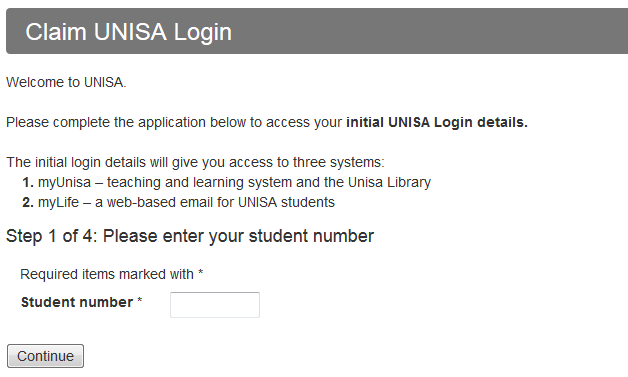
UNISA Login
If you already have UNISA Login username and password, you may proceed and login to MyUNISA student portal. To log in to UNISA, you can follow these steps:
- STEP 1: Visit UNISA Login page
- STEP 2: Click on “MyUNISA”
- STEP 3: Enter your UNISA Login username and password
- STEP 4: Click “Login”
- STEP 5: Access your dashboard
Once you have logged in, you will be able to access important information related to your studies, including your course material, assignments, exam results, and more. If you have any issues logging in or accessing your UNISA account, you can contact the UNISA support team for assistance.
How to Register myUnisa Account
You will be asked to enter your Unisa student number and my Unisa password to access Unisa online resources such as Unisa exam results, study material or Unisa registration. To create myUnisa account, you will need to follow the below steps. After you have followed all the below steps, make sure that you activate your myUnisa password which has been sent your Unisa myLife email. Make sure that you activate your password within 24 hours. How to Create a MyUNISA Account steps:
- STEP 1: Visit the myUNISA student portal
- STEP 2: Click on “Claim UNISA Login”
- STEP 3: Enter your “Student number” and then click “Continue” button
- STEP 4: Enter your personal information form (Surname, Full names, Date of Birth, South African ID Number, Passport Number or Foreign ID and then click “Continue”
- STEP 5: Read through the terms and conditions. Check the boxes and then click “Acknowledge”
- STEP 6: A page with your account details (mylife email address and phone number) will be displayed as well as an initial UNISA password. The password will be for both myUnisa and myLife email account
After you’ve successfully registered for myUnisa account, you can now make a myLife account. MyLife is a web-based email for UNISA students. You will use this official Unisa email account for all communication with the university and your lecturers. Only email from your myLife email address will be accepted.
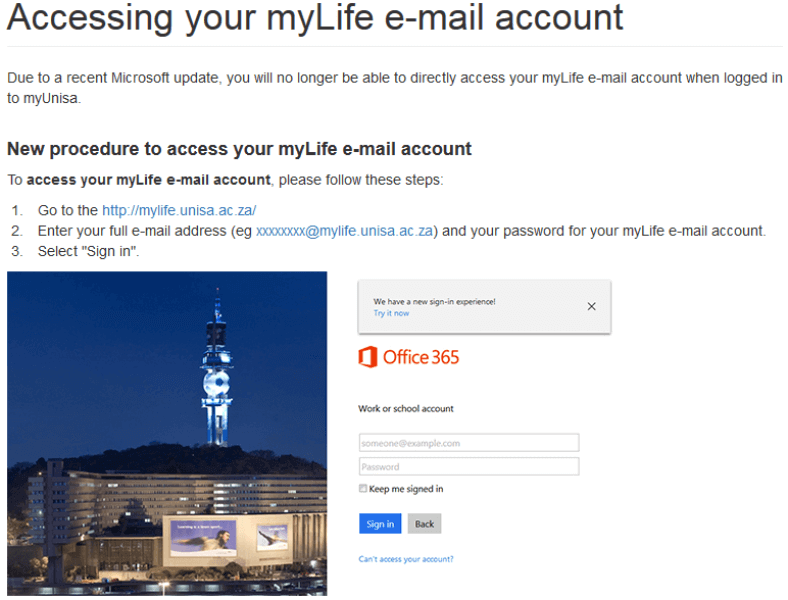
How Do I Access myUnisa mylife Account
Accessing your myLife e-mail account is very simple. You need to follow the below steps to access myUnisa mylife account.
- STEP 1: Visit https://mylife.unisa.ac.za on your internet browser
- STEP 2: Enter your full Unisa e-mail address (eg [email protected]) and your password for your Unisa myLife e-mail account provided in STEP 6.
- STEP 3: Then click the “Sign In” button to login to myLife account
How Do I Get Unisa Login Password
It may take up to 24 hours for your myLife email account to be successfully created. Once the account is created, you can sign in with your myLife email address and your myUnisa password. However, what happens if your password is not active on Unisa myLife? You will need to reset your password.
How to Reset Unisa Login Password
- STEP 1: Login to myUnisa and click on “My Admin”
- STEP 2: Click on the “Change Password” link
- STEP 3: Complete the form to update your password. Please note that this new password will be active for both your my Unisa and myLife accounts
It may take approximately 30 minutes for the new UNISA login password to activate on the my Unisa myLife service during peak periods. If you are still experiencing problems after resetting your password, please send an e-mail to [email protected] for assistance.
What Is UNISA?
Watch the below registering on my Unisa video
Image Courtesy: Unsplash