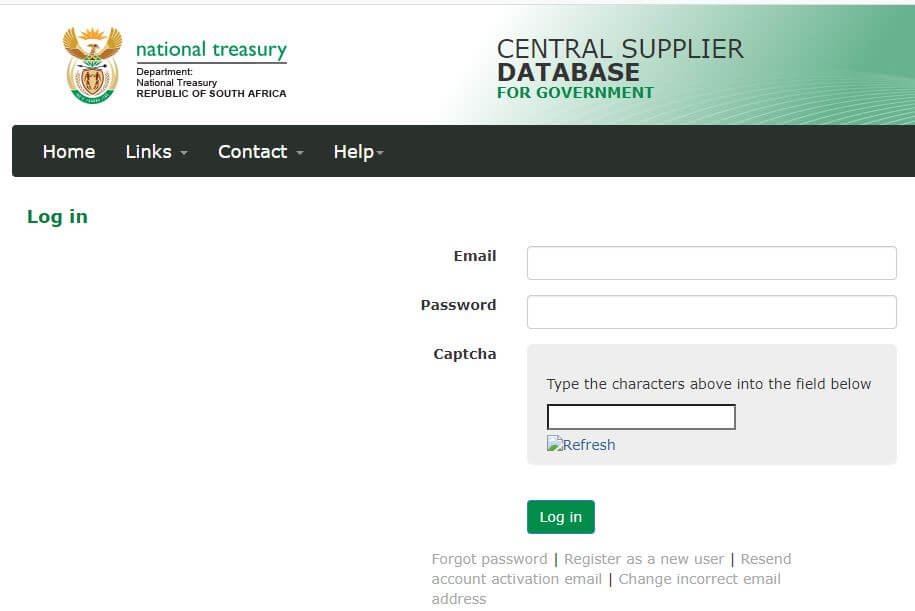
CSD Login is the process through which registered users of the Central Supplier Database (CSD) access their accounts. The Central Supplier Database serves as the repository for all supplier information across various levels of government in South Africa. Essentially, the CSD manages a comprehensive database comprising organizations, institutions, and individuals eligible to offer goods and services to the government. This article aims to elucidate the CSD Login process in South Africa.
How To Register A CSD Account?
To register a CSD account, follow these steps:
- Step 1: Visit the Central Supplier Database official site at https://secure.csd.gov.za/Account/Register
- Step 2: Provide the required information, including personal details and company information.
- Step 3: Verify your email address.
- Step 4: Complete the registration process by following the prompts and providing any additional requested information.
- Step 5: Once registered, you can log in to your CSD account using your email address and password.
CSD Login South Africa
If you’re a registered CSD customer, access the CSD login page at https://secure.csd.gov.za/Account/Login. Use your email address and CIPC password to log in. New to CSD services? Register by visiting the official Central Supplier Database site at https://secure.csd.gov.za/Account/Register.
Before logging in, ensure you have a valid email address; transactions are not possible without one. You can sign up for a free email address at Gmail.com.
CSD Login, CSD Sign In, Log Into CSD
To login to CSD services in South Africa, follow these simple steps:
- Step 1: Visit https://secure.csd.gov.za/Account/Login
- Step 2: Input your email address and password
- Step 3: Click on the “Login” button
CSD Login Password Reset
To reset your CSD login password, follow these steps:
- Step 1: Visit https://secure.csd.gov.za/Account/ForgotPassword
- Step 2: Enter your email address
- Step 3: Choose between ‘Email me a password reset link (Preferred)’ or ‘I want to reset my password using an OTP SMS’
- Step 4: Click “Submit”
- Step 5: Follow the instructions to create a new CSD password
What Is The CSD?
The Central Supplier Database (CSD) is a unified repository designed to consolidate all supplier data for government entities. Supplier details will undergo verification through entities like the South African Revenue Service, Companies and Intellectual Property Commission, and Department of Home Affairs. Suppliers must furnish accurate and comprehensive information on the CSD website to ensure compliance.
FAQs
Here are some potential FAQs for CSD login:
How do I log in to my CSD account?
To log in to your CSD account, visit the CSD login page at https://secure.csd.gov.za/Account/Login, enter your email address and password, then click “Login”.
What should I do if I forgot my CSD password?
If you forgot your CSD password, you can reset it by visiting https://secure.csd.gov.za/Account/ForgotPassword, entering your email address, selecting your preferred password reset method (email or OTP SMS), and following the instructions provided.
I am experiencing issues logging in. What should I do?
If you encounter any difficulties logging in to your CSD account, ensure that you are entering the correct email address and password. If the issue persists, try resetting your password or contact CSD customer support for assistance.
Can I use my CIPC login credentials to access CSD?
No, CSD and CIPC are separate systems with their own login credentials. You need to register and create a separate account for CSD.
Is my CSD account information secure?
Yes, CSD takes security measures to protect your account information. However, it’s essential to use strong, unique passwords and avoid sharing your login credentials with others to enhance security.
Can I access CSD from any device?
Yes, you can access CSD from any device with an internet connection and a compatible web browser. Ensure that you log out of your account when using shared or public devices to maintain security.
I’m a new supplier. How do I register for a CSD account?
If you’re a new supplier, you can register for a CSD account by visiting https://secure.csd.gov.za/Account/Register and following the registration process. You’ll need to provide personal and company information to complete the registration.
What should I do if I encounter technical issues during the login process?
If you experience technical issues during the login process, such as error messages or page loading problems, try refreshing the page or clearing your browser’s cache and cookies. If the issue persists, contact CSD technical support for assistance.
Conclusion
In conclusion, the Central Supplier Database (CSD) plays a vital role in streamlining supplier information for government entities in South Africa. With its user-friendly interface and secure login system, suppliers can efficiently manage their accounts and ensure compliance with government procurement regulations. By following the provided FAQs and registration steps, users can navigate the CSD platform effectively, accessing the necessary tools to participate in government procurement processes. Should any issues arise, CSD offers support services to address user concerns promptly.
Image Courtesy: CSD