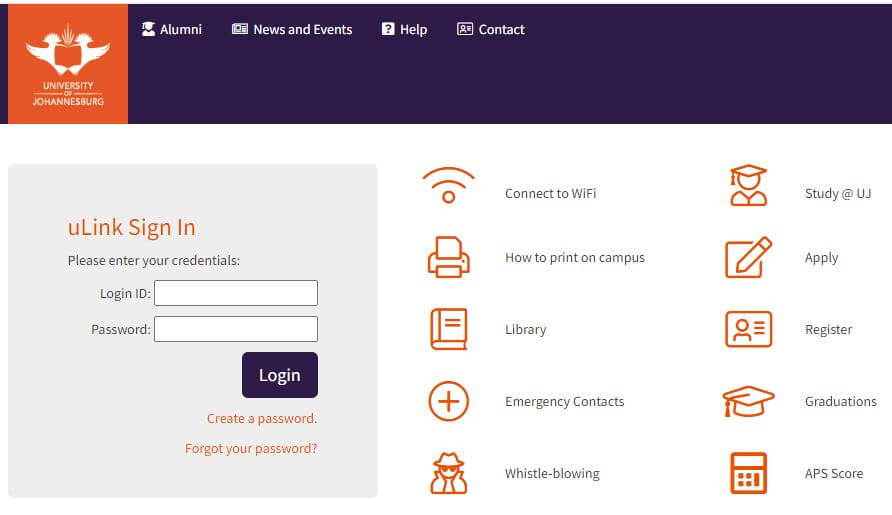
uLink UJ is an online student portal for the University of Johannesburg (UJ). It provides UJ students with a range of online services and resources to help them manage their academic and personal lives. uLink UJ is a one-stop-shop for students to access information related to their academic progress, financial information, library resources, campus news, and events. The portal provides a centralized platform for students to access important information related to their studies, making it an essential tool for all UJ students. Through uLink UJ, students can stay connected with the university and access the services they need, whether they are on campus or studying remotely.
What is uLink Login?
uLink Login is the process of accessing the uLink UJ portal, which is an online student portal for the University of Johannesburg (UJ). It allows UJ students to access a range of online services and resources related to their academic progress, financial information, library resources, campus news, and events. To log in to uLink UJ, students must enter their UJ student number and password. Once logged in, students can access the information and services they need to manage their academic and personal lives, making it an essential tool for all UJ students.
How to Login to uLink?
To login to uLink, follow these steps:
- Open your web browser and go to the uLink UJ portal website: https://ulink.uj.ac.za/
- Enter your UJ student number in the “User ID” field.
- Enter your password in the “Password” field.
- Click on the “Login” button.
- Once you have successfully logged in, you will be taken to the uLink UJ homepage, where you can access a range of services and resources related to your academic progress, financial information, library resources, campus news, and events.
Note: If you are a first-time user, you will need to activate your uLink account before you can log in. To activate your account, go to https://mylogin.uj.ac.za/ and follow the instructions provided.
How to Reset uLink Password?
To reset your uLink password, follow these steps:
- Go to the uLink UJ portal website: https://ulink.uj.ac.za/
- Click on the “Forgot Password?” link below the login fields.
- Enter your UJ student number in the “User ID” field.
- Enter the characters you see in the image in the “CAPTCHA” field.
- Click on the “Next” button.
- Select the email address or phone number where you would like to receive the password reset link or code.
- Click on the “Send” button.
- Follow the instructions in the email or message you receive to reset your uLink password.
Note: If you have any issues with resetting your password, you can contact the UJ IT Help Desk for assistance.
How Do I Register for the UJ uLink Student Portal?
To register for the UJ Ulink Student Portal, you must first be enrolled as a student at the University of Johannesburg (UJ). Once you are enrolled, follow these steps to register for the portal:
- Go to the Ulink UJ portal website: https://ulink.uj.ac.za/
- Click on the “New User” link below the login fields.
- Enter your UJ student number in the “User ID” field.
- Enter your birth date in the format of DD/MM/YYYY in the “Date of Birth” field.
- Enter the characters you see in the image in the “CAPTCHA” field.
- Click on the “Next” button.
- Follow the instructions to set up your uLink account and create a password.
- Once you have created your account, you can log in to the portal using your UJ student number and password.
Note: If you have any issues with registering for uLink, you can contact the UJ IT Help Desk for assistance.
What Does the UJ uLink Student Online Resource contain?
The UJ uLink Student Online Resource is a comprehensive student portal that provides access to a variety of academic resources and services for University of Johannesburg (UJ) students. Some of the features of the uLink portal include:
- Course Registration: Students can register for courses and manage their academic schedules.
- Financial Aid and Fees: Students can access information about tuition fees, financial aid, bursaries, and scholarships.
- Exam Results: Students can view their exam results and academic progress.
- Library Resources: Students can access digital resources, books, journals, and articles from the UJ library.
- Campus News and Events: Students can stay up to date with campus news and events, including student clubs and societies, guest lectures, and seminars.
- Personal Information: Students can manage their personal information, including contact details, emergency contacts, and academic transcripts.
- IT Services: Students can access UJ’s IT services, including Wi-Fi, email, and software downloads.
- Career Services: Students can access career services, including job search tools, resume writing support, and career counseling.
Overall, uLink provides UJ students with a one-stop-shop for accessing academic resources and services, helping them to succeed in their studies and prepare for their future careers.
Conclusion
In conclusion, uLink is an essential student portal for the University of Johannesburg (UJ) students. It provides them with access to important academic resources, financial information, library resources, campus news, and events. Students can easily log in to uLink using their UJ student number and password, and can even access the portal on their mobile devices. If they ever forget their password or have trouble logging in, they can easily reset their password or contact the UJ IT Help Desk for assistance. Overall, uLink is an important tool for UJ students to stay informed and succeed in their academic journey.
uLink Login FAQs
Here are some frequently asked questions (FAQs) related to uLink login:
What is uLink?
uLink is an online student portal for the University of Johannesburg (UJ). It provides students with a range of online services and resources related to their academic progress, financial information, library resources, campus news, and events.
How do I log in to uLink?
To log in to uLink, you must enter your UJ student number and password on the uLink UJ portal website: https://ulink.uj.ac.za/
What should I do if I forgot my uLink password?
If you forgot your uLink password, you can reset it by clicking on the “Forgot Password?” link on the uLink UJ portal website and following the instructions provided.
What should I do if I am having trouble logging in to uLink?
If you are having trouble logging in to uLink, you can contact the UJ IT Help Desk for assistance.
Is uLink accessible on mobile devices?
Yes, uLink is accessible on mobile devices through the use of a web browser.
Image Courtesy: https://ulink.uj.ac.za/Default