• About Us
  • Advertise With Us
  • Contact Us
Sunday, December 14, 2025
Quick Read Magazine
  • Home
  • News
  • Business
  • Finance
  • Entertainment
  • Jobs
  • Technology
No Result
View All Result
  • Home
  • News
  • Business
  • Finance
  • Entertainment
  • Jobs
  • Technology
No Result
View All Result
QuickRead.Co.Za
No Result
View All Result
  • Home
  • News
  • Business
  • Finance
  • Entertainment
  • Jobs
  • Technology

Home » Banking » Capitec Online Banking Login Without App

Capitec Online Banking Login Without App

Hlulani Baloyi by Hlulani Baloyi
2 years ago
in Banking, Finance, How To, Money
Reading Time: 2 mins read
Capitec Online Banking Login Without App

Capitec Online Banking Login Without App

ADVERTISEMENT

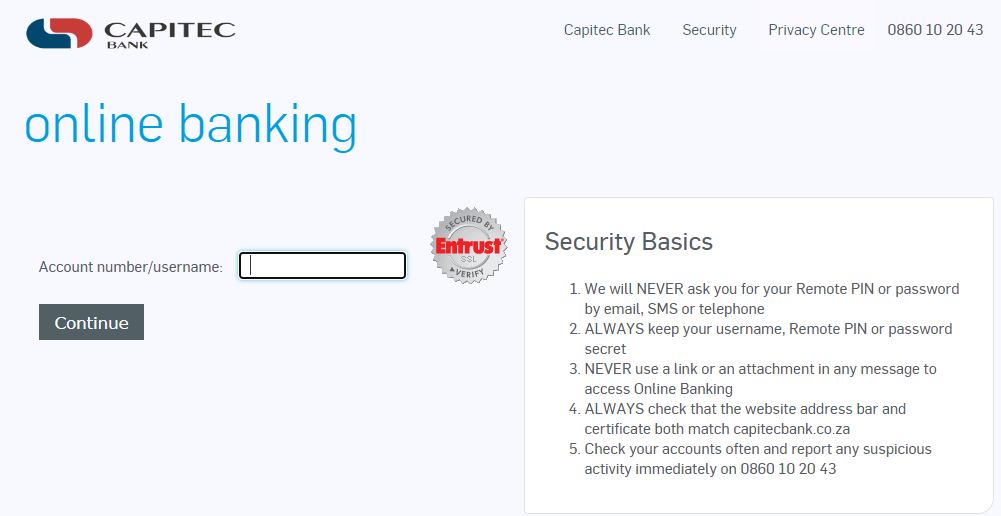
Capitec Online Banking Login Without App in South Africa. You can access Capitec Online Banking without the app by using their website: https://www.capitecbank.co.za/personal/transact/online-banking/. In this article, you will learn how to login to Capitec Bank online without using the Capitec App.

ALSO READ: How To Download Capitec App For Android Phone?

Capitec Online Banking Login Without App

Follow the below steps to log into Capitec Online Banking without using the app:

ADVERTISEMENT
  1. Go to the Capitec Online Banking website: https://www.capitecbank.co.za/personal/transact/online-banking/
  2. Click on “Online Banking Login”
  3. Enter your Account number/username and click “Continue”
  4. Enter your Password
  5. Click “Login”

Capitec Online banking

The Capitec Online Banking is a secure and user-friendly online banking that saves you money with no monthly subscription fee. Login now to manage your finances effortlessly.

Access your main savings account, savings plans, access facility, credit card, or Live Better savings at your convenience:

  • Transfer money between accounts
  • Pay beneficiaries or accounts
  • Purchase airtime, data, and SMS bundles (for yourself or a friend)
  • Buy electricity (for yourself or a friend) and view your last purchased tokens
  • Add beneficiaries and set up recurring or future-dated payments
  • Send cash to family and friends
  • Conduct access facility transfers
  • Dispute debit orders up to 40 days old, and view active, stopped, and disputed orders
  • Approve or decline DebiChecks
  • Create or add flexible and fixed-term savings accounts
  • Send payment notifications
  • Report lost or stolen cards instantly
  • Update daily card and digital limits
  • Update your tax details and view/download tax interest certificates
  • Manage tap-to-pay settings (enable/disable)
  • Save and verify your email address for added security
  • View your personal details
  • View and download statements
  • Review your transaction and payment history
  • Change your SMS Update settings

Conclusion

In conclusion, you can access Capitec Online Banking without the app, offering convenience and flexibility. However, using the app might provide additional security features or a more streamlined experience.

Image Courtesy: capitecbank.co.za

Tags: Capitec AppCapitec Online Banking LoginCapitec Online Banking Login Without App
ShareTweetSend
ADVERTISEMENT
Previous Post

Daily Lotto Results: Tuesday, 21 May 2024

Next Post

Paymenow Employer Login

Hlulani Baloyi

Hlulani Baloyi

Hlulani Baloyi is a contributing writer at Quick Read. Studied Journalism at Rosebank College. Loves reading books. Passionate in exploring and cooking local cuisines. Enthusiastic as an amateur cricket player.

Related Posts

How to Reverse Payment on Capitec App That Is Not a Debit Order

How to Reverse Payment on Capitec App That Is Not a Debit Order

4 August 2025
Capitec App Download

How to Download Capitec Bank App in South Africa (2025 Guide)

24 March 2025
How to Delete A Savings Account On Capitec App In South Africa

How to Delete A Savings Account On Capitec App In South Africa?

26 January 2025
Capitec App Download

Capitec App Download in South Africa

12 January 2025
Capitec Bank Statement

4 Quick Steps to Get a Bank Statement from The Capitec App

7 January 2025
How To Reverse Money Using Capitec App On iPhone

How To Reverse Money Using Capitec App On iPhone In South Africa

17 November 2024
Next Post
Paymenow Employer Login

Paymenow Employer Login

Leave a Reply Cancel reply

Your email address will not be published. Required fields are marked *

Latest Posts

John Cena Final WWE Match

John Cena’s Final WWE Match Ends In Brutal Loss

14 December 2025
NSFAS has officially closed applications for 2026 funding

NSFAS has officially closed applications for 2026 funding

14 December 2025
UK49s Win Kwik Pick 3 Lunchtime For Today

UK49s Win Kwik Pick 3 Results South Africa for Sunday, 14 December 2025

14 December 2025
UK49s Teatime Results 2024

UK49s Teatime Results South Africa for Sunday, 14 December 2025

14 December 2025
UK49s Win Kwik Pick 3 Lunchtime For Today

UK49s Win Kwik Pick 3 Lunchtime Results for Today – Sunday, 14 December 2025

14 December 2025
  • About Us
  • Contact Us
  • Advertise With Us
  • Privacy
  • Terms and conditions
Follow Us

QuickRead.Co.Za | All Rights Reserved

No Result
View All Result
  • About Us
  • Advertise With Us
  • Contact Us

QuickRead.Co.Za | All Rights Reserved